 info@goodhopetutoring.com
 +1-301-717-8046




Most high schoolers already have a smartphone and a laptop. The tools on this list cost nothing, work on both, and are used daily by real students who figured out that studying smarter is infinitely better than studying longer.
1. Khan Academy — Free Lessons for Every Subject, at Every Level
What it is: A completely free, nonprofit learning platform with thousands of video lessons, practice exercises, and full courses covering math, science, history, English, SAT prep, and more.
Why it works: When a teacher explains something and it does not click, Khan Academy gives students a second (or third) explanation — delivered differently, at their own pace, as many times as they need. The math courses in particular are exceptional. Each concept is broken into small, sequential lessons, so students can go back to exactly where their understanding broke down rather than sitting confused through material that assumes they understand something they do not.
Best for: Catching up on a subject, reviewing before a test, and SAT math prep — the College Board partnered with Khan Academy to offer official free SAT practice, which is one of the most valuable free resources a junior or senior can use.
Get it: khanacademy.org — no download needed, works in any browser.
2. Quizlet — Flashcards That Actually Adapt to What You Don't Know
What it is: A digital flashcard and study tool with a massive library of existing card sets created by students for almost every textbook, AP course, and subject imaginable — plus the ability to create your own.
Why it works: Quizlet's free tier includes spaced repetition — an algorithm that surfaces the flashcards you got wrong more frequently and the ones you know well less often. This is not just a convenience feature. Spaced repetition is one of the two most evidence-backed study techniques in learning science, confirmed by research published by Dunlosky et al. and widely cited in cognitive psychology literature. The system does the scheduling work so students do not have to.
Best for: Vocabulary-heavy subjects like biology, history, and foreign language, as well as AP exam prep. Searching for the textbook name plus the chapter number in Quizlet almost always returns a usable set made by another student.
Get it: quizlet.com — free on web, iOS, and Android.
3. Anki — The Flashcard Tool Serious Students Swear By
What it is: A free, open-source flashcard app built entirely around spaced repetition. Unlike Quizlet, Anki is more technical to set up but far more powerful for students who have a heavy memorization load.
Why it works: Anki's algorithm is built on decades of memory research. After reviewing a card, students rate how well they knew it, and the app calculates exactly when to show that card again based on the forgetting curve, the well-documented pattern of how quickly information fades without reinforcement. Medical students, law students, and language learners have been using Anki for years because nothing beats it for retaining large amounts of information long-term.
Best for: AP Biology, AP Chemistry, AP Psychology, foreign language vocabulary, and any course where memorizing specific terms or facts is a core requirement.
Get it: apps.ankiweb.net — completely free on desktop and Android. (The iOS app has a one-time cost, but the desktop version is free and fully functional.)

4. Desmos — A Graphing Calculator in Your Browser, Always Free
What it is: A free, browser-based graphing calculator that is more powerful and easier to use than most physical graphing calculators, and costs nothing.
Why it works: Desmos is the built-in calculator now used in the digital SAT. Students who are already comfortable with it going into test day have a meaningful advantage over those encountering it for the first time. Beyond test prep, it makes algebra and precalculus concepts significantly more visual — students can graph a function, drag a slider, and watch in real time how changing a value shifts the curve. That interactivity makes abstract concepts concrete in a way that a textbook cannot.
Best for: Algebra 2, Precalculus, Calculus, and SAT math prep.
Get it: desmos.com/calculator — runs in any browser, no account required.
5. Wolfram Alpha — For When Math Gets Hard and Google Gets Useless
What it is: A computational search engine that solves math problems step by step and explains how the answer was reached.
Why it works: Google can tell you what a derivative is. Wolfram Alpha will solve the derivative of your specific function, show every step of the working, graph the result, and explain the method used. For students who are stuck on a problem and need to understand the process — not just the answer — this is invaluable. It covers algebra, calculus, statistics, chemistry, physics, and more.
Best for: Checking work, understanding where a calculation went wrong, and working through math or science problems that have multiple steps.
Get it: wolframalpha.com — free for most standard queries, no account needed.
6. Notion — One Place for Every Class, Every Assignment, Every Deadline
What it is: A flexible digital workspace for notes, task management, calendars, and databases — completely free for students with a school email address.
Why it works: The problem most high schoolers have is not that they forget to study — it is that their notes are in three different places, their assignment deadlines live in their head, and their revision schedule does not exist yet. Notion solves all three at once. Students can build a simple dashboard with a page for each class, a table of upcoming deadlines, and reading notes that are actually searchable later.
Best for: Students who feel organizationally overwhelmed and need one system that covers everything rather than five apps that do not talk to each other.
Tip: Start with a pre-built student template from Notion's template gallery rather than building from scratch. The learning curve is real but short.
Get it: notion.so — free with a school email, or with limited features on a personal email.
7. Google Calendar — The Simplest Tool on This List and One of the Most Powerful
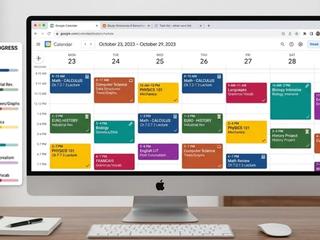
What it is: A free calendar app that most students already have access to through their school Google account but massively underuse.
Why it works: Students who block specific study times on a calendar — not just write "study" on a to-do list — are far more likely to follow through. There is a meaningful psychological difference between a task sitting on a list and a time block on a calendar that shows a specific subject, at a specific time, for a specific duration. Color-coding by subject makes it visual. Setting reminders 30 minutes before means there is no excuse to forget.
Best for: Managing the whole week at once — classes, extracurriculars, study sessions, and deadlines — so nothing sneaks up.
Get it: calendar.google.com — free, syncs across all devices automatically.
8. Pomofocus — A Free Timer That Turns Studying Into Something Manageable
What it is: A free, browser-based Pomodoro timer. The Pomodoro technique breaks study sessions into 25-minute focused blocks followed by a 5-minute break, with a longer break after every four cycles.
Why it works: The single biggest reason students avoid studying is because they open their books, look at how much there is to cover, and immediately feel overwhelmed. The Pomodoro method removes the overwhelm by shrinking the task: the only question is whether you can focus for 25 minutes. Most students can. After the timer goes off, they take a break and go again. The structure makes starting easier and sustains focus longer than open-ended study sessions with no defined endpoint.
Best for: Students who procrastinate, get distracted easily, or tend to study in exhausting three-hour blocks that lead to burnout.
Get it: pomofocus.io — free, no account required, works in any browser.
9. Grammarly — For Every Essay, Every Email, Every Written Assignment
What it is: A free writing assistant that checks grammar, clarity, and style in real time as students write.
Why it works: The free version of Grammarly catches grammatical errors, unclear sentences, passive voice overuse, and basic spelling issues, which covers the vast majority of writing mistakes high schoolers make on essays and assignments. It works inside Google Docs, Microsoft Word, and any text field in a browser, so students do not have to copy and paste their work anywhere.
What it is not: A tool for writing the essay for you. Grammarly improves writing that already exists. Students still need to do the thinking, the argument, and the drafting themselves. Used correctly, it is the equivalent of having a proofreader go over every piece of work before it is submitted.
Best for: Essays, research papers, college application drafts, and any written assignment where presentation matters.
Get it: grammarly.com — free browser extension and desktop app.
10. Khan Academy's Official SAT Practice (via College Board) — Worth Listing Separately
What it is: Free, full-length, official digital SAT practice tests built in partnership between the College Board and Khan Academy, delivered through the College Board's Bluebook app — the same platform used on actual SAT test day.
Why it works: There is no substitute for practicing in the exact environment of the real test. The Bluebook app includes the same adaptive question format, the same built-in Desmos calculator, the same interface, and the same timing structure as the actual digital SAT. Students who practice on Bluebook are not just reviewing content — they are building familiarity with the platform itself, which reduces anxiety and improves pacing on test day.
Seven free full-length practice tests are available. That is an entire prep course, at no cost, using official materials.
Best for: High school juniors and seniors preparing for the SAT, or any student who wants to see exactly where they stand before committing to a prep plan.
Get it: Search "Bluebook College Board" to download the app, then access practice tests through your free College Board account.
One Rule That Makes All of These More Effective
Research from Rosen, Carrier, and Cheever consistently shows that students who build a consistent system around three to four tools — and stick with it for at least a semester — outperform students who constantly switch between new apps. The tool matters less than the habit.
Pick two or three from this list that match the problems you are actually facing right now. If organization is the gap, start with Notion and Google Calendar. If memorization is the issue, start with Quizlet or Anki. If math is where you are losing points, start with Khan Academy and Desmos. Build the habit with those first before adding anything else.
For students who need more than tools — who have a genuine content gap that apps alone cannot fill — our post on addressing learning gaps through personalized tutoring explains exactly when and why structured one-on-one support makes the difference that self-study tools cannot.
And if exams are the specific pressure point, the strategies in how to prepare your child for standardized tests pair directly with the tools above to build a complete test prep approach that does not rely on last-minute cramming.
At Good Hope Tutoring Services, our tutors help students not just fill content gaps but build the study systems and habits that make tools like these actually work. We serve students Pre-K through 12th grade, in person in the Maryland and DMV area and virtually nationwide.
Good Hope Tutoring Services is a New Majority-Owned tutoring company trusted by Baltimore County Public Schools, M-NCPPC Department of Parks and Recreation, and families across the DMV for over 25 years.
Sources
- Laxu AI: Best Study Apps for Students 2026
- KIS Academics: Best Study Apps for High School Students in 2026
- WholeSyllabus: 25+ Best Study Tools and Resources 2026
- SuperKnowva: Best Study Apps 2026
- Dunlosky et al. (2013): Improving Students' Learning With Effective Techniques — Psychological Science in the Public Interest